Latest Version
version 2.3.4.jar
The SDK supports configurable scan modes:
CollectionReq.SCAN_TYPE_SCAN — Scan customer QR codeCollectionReq.SCAN_TYPE_QRCODE — Display QR code for customer to scan
Example
CollectionReq req = new CollectionReq(Long.parseLong(money));
req.setScan_type(scan_type);
To force QR code display mode (e.g. static QR for customer scanning), use SCAN_TYPE_QRCODE.The default camera used is the rear camera.
Introduction
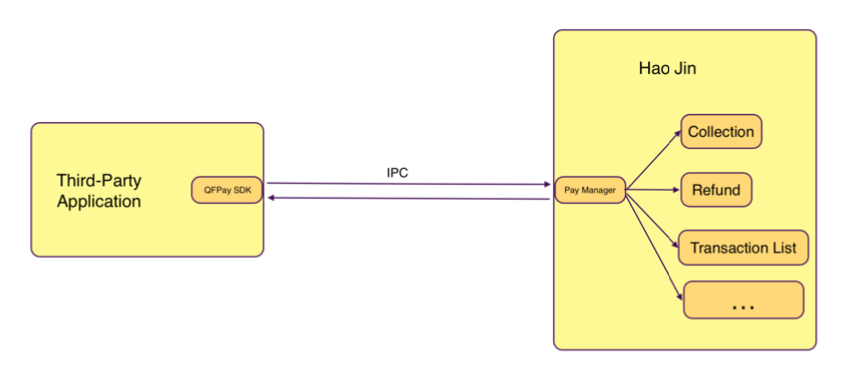
HaoJin is a mobile application that provides integrated payment collection for merchants.
This SDK enables third-party apps to invoke HaoJin for payment operations.
Supported capabilities:
- Payment, refund, transaction query, and transaction details
- Transaction summary and channel configuration retrieval
- Card transaction query, cancellation, and adjustment
Installation & Setup
Required Permission
Add to AndroidManifest.xml:
<uses-permission android:name="com.qfpay.haojin.permission.OPEN_API"/>
HaoJin App must be installed on the device.
Integrate JAR
Download and place the SDK in /libs, then import in build.gradle.
Download Latest SDK
Set Target App ID
Config.setTargetAppId("in.haojin.nearbymerchant.oversea");
Proguard Rules
Add to proguard-rules.pro:
-dontnote com.qfpay.haojin.model.**
-keep class com.qfpay.haojin.model.** {*;}
API Usage
Create Trade API Instance
ITradeAPI mTradeApi = TradeApiFactory.createTradeApi(XXXActivity, this);
Collection (Payment)
CollectionReq collectionReq = new CollectionReq(100);

collectionReq.setScan_type(CollectionReq.SCAN_TYPE_SCAN);
collectionReq.setOut_trade_no("EXT202312345");
collectionReq.setWait_card_timeout(120);
collectionReq.setPay_method("card_payment");
collectionReq.setCamera_id(0);

int ret = mTradeApi.doTrade(collectionReq);
Parse Result
CollectionResp collectionResp =
    (CollectionResp) mTradeApi.parseResponse(requestCode, resultCode, data);

if (collectionResp == null) return;

if (collectionResp.isSuccess()) {
    Transaction transaction = collectionResp.getPayResult();
} else {
    Log.e(TAG, collectionResp.getErrorMsg());
}
The returned response may be null. Always perform a null check.
Refund
RefundReq refundReq = new RefundReq(qfOrderId);
int ret = mTradeApi.doTrade(refundReq);
Parse
RefundResp refundResp =
    (RefundResp) mTradeApi.parseResponse(requestCode, resultCode, data);

if (refundResp != null && refundResp.isSuccess()) {
    Transaction transaction = refundResp.getRefundResult();
}
Query Transactions
Multiple Transactions
GetTransListReq req = new GetTransListReq();
req.setChannels(selectedChannel);
req.setTypes(selectedType);
req.setMonth(month);
req.setStartTime(startTime);
req.setEndTime(endTime);
req.setPageSize(pageSize);
req.setPageNum(pageNum);

int ret = mTradeApi.doTrade(req);
• Supported types: payment, refund
• Time format: yyyy-MM-dd HH:mm:ss
• Month format: yyyyMM
• Page index starts from 1
• Time range overrides monthly query
Transaction Detail
GetTransReq req = new GetTransReq(qfOrderId);
req.setOut_trade_no("EXT20230123");
int ret = mTradeApi.doTrade(req);
Transaction Summary
CheckTradeSumReq req = new CheckTradeSumReq();
int ret = mTradeApi.doTrade(req);
User Configuration
GetUserConfigReq req = new GetUserConfigReq();
int ret = getTradeApi().doTrade(req);
If user configuration cannot be retrieved, it may indicate an authorisation issue. Contact technical support.
Pre-authorisation
Suitable for scenarios such as hotel check-ins or equipment rental where funds are reserved and later captured or cancelled.
Deduct
PreAuthTransDeductReq req = new PreAuthTransDeductReq(transId);
int ret = mTradeApi.doTrade(req);
Cancel
PreAuthTransCancelReq req = new PreAuthTransCancelReq(transId);
int ret = mTradeApi.doTrade(req);
List
PreAuthTransListReq req = new PreAuthTransListReq(10, 1);
int ret = mTradeApi.doTrade(req);
Detail
PreAuthTransDetailReq req = new PreAuthTransDetailReq(transId);
int ret = mTradeApi.doTrade(req);
Card Operations
Card Refund
CardRefundReq req = new CardRefundReq(qfOrderId);
int ret = mTradeApi.doTrade(req);
Card Settlement
CardSettleReq req = new CardSettleReq();
int ret = mTradeApi.doTrade(req);
Version History
v2.3.4
- Added scan type configuration
v2.3.3
- Added
getOut_trade_no and getCardscheme methods
v2.3.2
- External order number support
- Configurable card swipe timeout
v2.3.1
- Payment method selection support
- Camera selection support