
Integration Overview
Choose the flow that matches your application architecture:| Platform | Flow Type | Usage Scenario | Launch Method |
|---|---|---|---|
| Android | Native App | App directly triggers FPS payment | Intent to bank app |
| Android | H5 to App | WebView triggers FPS payment | JSBridge + Intent |
| iOS | Native App | App directly triggers FPS payment | UIActivityViewController |
| iOS | H5 to App | WKWebView triggers FPS payment | WKWebView + JSBridge |
- Retrieve payment parameters via API
- Launch the FPS bank app
- Receive callback or verify payment status
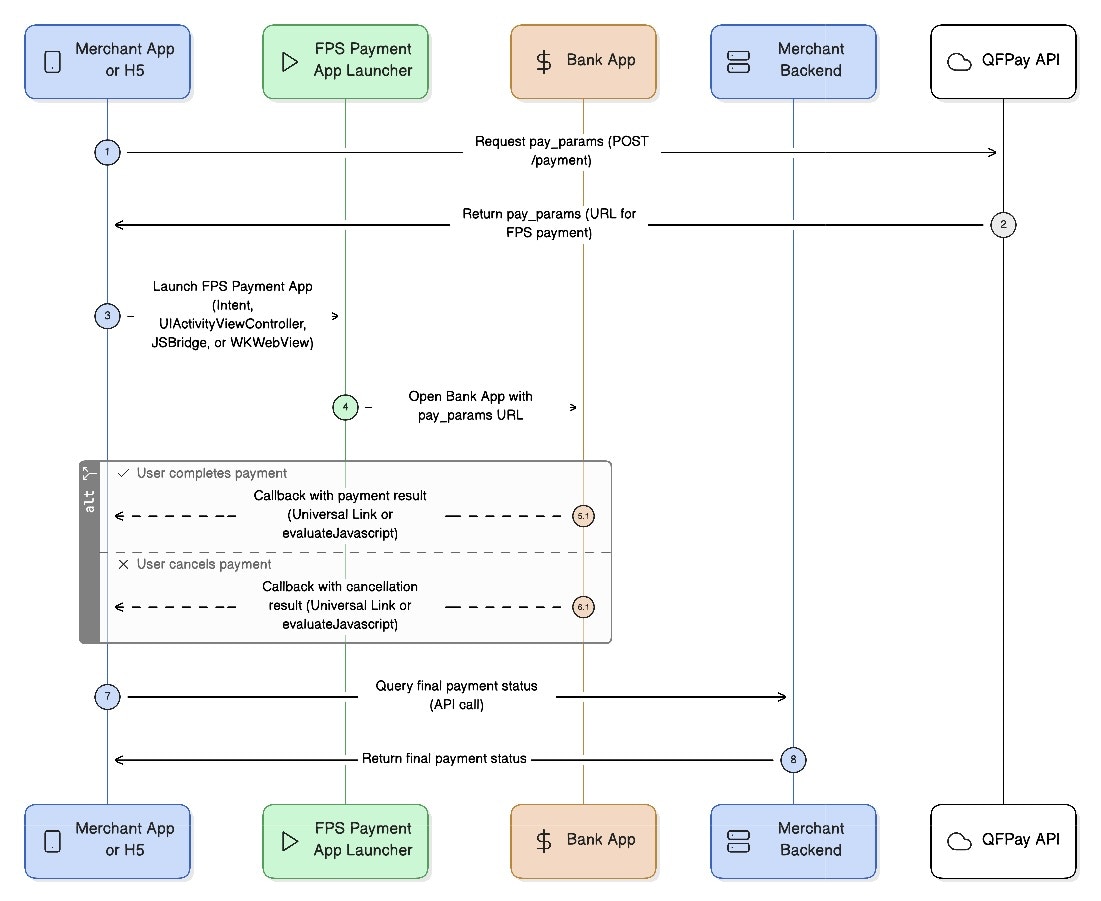
1. Retrieve Payment Parameters
EndpointPOST /trade/v1/payment
PayType: 802010
Request Parameters
| Parameter | Required | Type | Description |
|---|---|---|---|
pay_type | Yes | String | Fixed value 800210 |
txamt | Yes | Int | Amount in cents (100 = HKD 1.00) |
txdtm | Yes | String | Format: YYYY-MM-DD hh:mm:ss |
out_trade_no | Yes | String | Unique merchant order reference |
| … | — | — | See Common Parameters |
Response Parameters
| Name | Description |
|---|---|
| Common Response Fields | See response format documentation |
pay_params | URL used to launch the FPS payment app |
2. Android FPS Payment Flow
2.1 Native App-to-App Flow
This flow launches the banking app directly using an Android Intent.- Retrieve
pay_paramsfrom API - Launch bank app using Intent
- Receive result via
onActivityResult - Verify final status via backend
Android Example
2.2 Android H5-to-App (WebView)
Used when an H5 page inside WebView launches the FPS app. Flow- Enable JavaScript in WebView
- Register JS bridge
- H5 sends payment URL to Android
- Android launches bank app
- Return result to H5
- Verify payment via backend
3. iOS FPS Payment Flow
3.1 Native App-to-App Flow
iOS uses UIActivityViewController and App Extensions to launch bank apps. Flow- Retrieve payment URL
- Launch bank app via extension
- User completes payment
- App receives Universal Link callback
- Verify status via backend
Key Steps
• CreateNSExtensionItem• Package payment URL & callback URL
• Use type identifier:
hk.com.hkicl• Present
UIActivityViewController
3.2 iOS H5-to-App via WKWebView
Used when FPS payment is triggered from an H5 page. Flow- H5 retrieves payment URL
- H5 calls native app via JSBridge
- Native launches bank app
- Native returns result to H5
- Backend verifies final payment
Error Handling & Fallbacks
Result Codes
| Code | Meaning |
|---|---|
| RESULT_OK | Payment app launched successfully |
| RESULT_CANCELED | Cancelled, failed, or timeout |
If FPS App Is Not Installed
If no supported bank app is available: • show an error message• provide fallback QR payment
• allow retry
Callback Failure
If callback or redirect fails: • inform user payment is verifying• re-query backend after 3–5 seconds
• display loading or retry option
Demo Downloads
| Platform | Flow | Demo |
|---|---|---|
| Android | Native & WebView | Download |
| iOS | Native (Obj-C) | https://img-int.qfapi.com/upstatic/20251120c100/FPSDemo/FPSElement.zip |
| iOS | Native (Swift) | https://img-int.qfapi.com/upstatic/20251120c100/FPSDemo/FPSElementDemo.zip |
| iOS | JSBridge | https://img-int.qfapi.com/upstatic/20251120c100/FPSDemo/fps-bridge.zip |